
How to Capture and Retrieve information in Obsidian
A guide on capturing and retrieving information in a PKM system like Obsidian.


Before I discovered Obsidian, my thoughts were scattered, and my ideas slipped through the cracks. I relied on my memory to track everything — until I realized that wasn’t sustainable.
The Problem
We collect information but often lose it before we need it. An effective PKM system ensures that knowledge is both captured efficiently and retrieved effortlessly.
At its core, an effective PKM system follows three fundamental principles:
Capture valuable information as you discover it.
Retrieve it effortlessly when needed.
Organize it meaningfully for long-term utility.
Before optimizing capture and retrieval, we must first understand how information is structured. Broadly, it falls into three categories:
Notes
Logs
Metadata
Let’s dive into each of these and explore how to make the most of them in your PKM workflow.
1. Notes
Notes are any standalone pages you create in your PKM. Every new note you create should have future retrieval in mind — otherwise, why capture it in the first place?
Examples of Notes:
Knowledge Notes: Recipes, book summaries, research, tutorials, song chords, etc.
Journaling: Daily note which hosts information on sleep, diet, mood, exercise, social interactions, work, thoughts, etc.
Meetings: Notes capturing participants, tags, tasks, questions, next steps, and ideas.
Project Notes: A centralized place where related information from meetings, research, and tasks can be retrieved.
Capturing and Retrieving Notes
In Obsidian, Dataview queries help retrieve relevant notes dynamically based on specific criteria, ensuring information remains easily accessible.
Example: Retrieving Recipe Notes
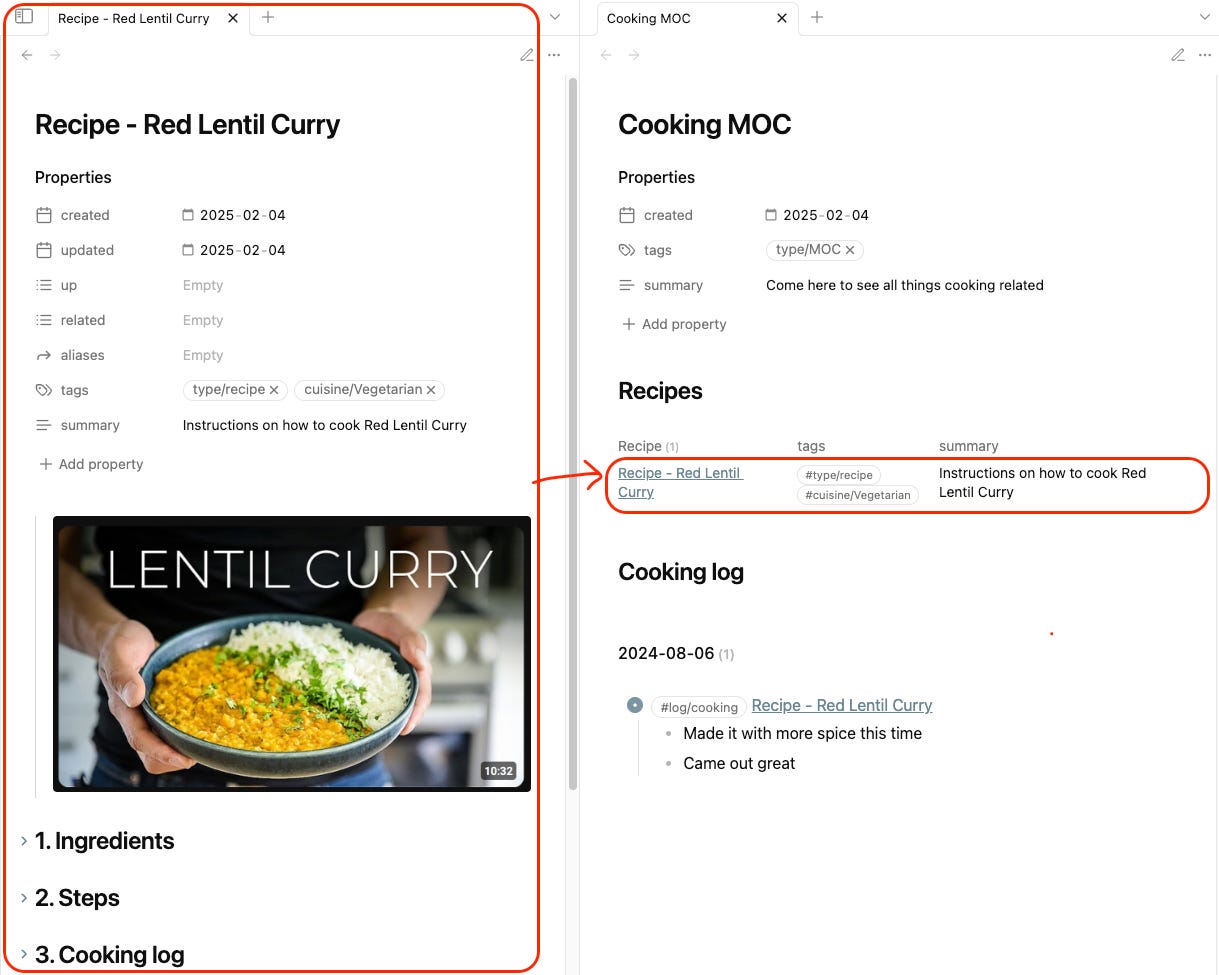
```dataview
TABLE
WHERE icontains(tags, "#type/recipe")
```
This query, placed in a [[Recipe Home Page]] note, gathers all recipe-related notes in one place.
2. Logs
Logs are pieces of information within a note that you may want to retrieve elsewhere.
Examples of logs:
- [ ] #task pick up the groceries.
- [ ] #log/exercise/run Ran 5km in 25 minutes.
- [ ] #log/reading Finished reading [[Atomic Habits]].
- [ ] #on/travel #on/South-Africa came across a beautiful hike called [[Crystal Pools Hike South Africa]] [Link here](https://example.com).
- [ ] #on/health #on/sleeping Learned from [[Matthew Walker]] (sleep scientist): Turn off bright lights 2h before bed. Avoid caffeine after 14:00.
- [ ] #on/restaurant #on/Amsterdam A new Resaurant I want to try called [[Nights Kitchen - Amsterdam Restaurant]]
- [ ] #log/cooking Cooking a new recipe [[Recipe - Red Lentil Curry]]
Example: Cooking Log Retrieval
- [ ] #log/cooking Cooking a new recipe [[Recipe - Red Lentil Curry]]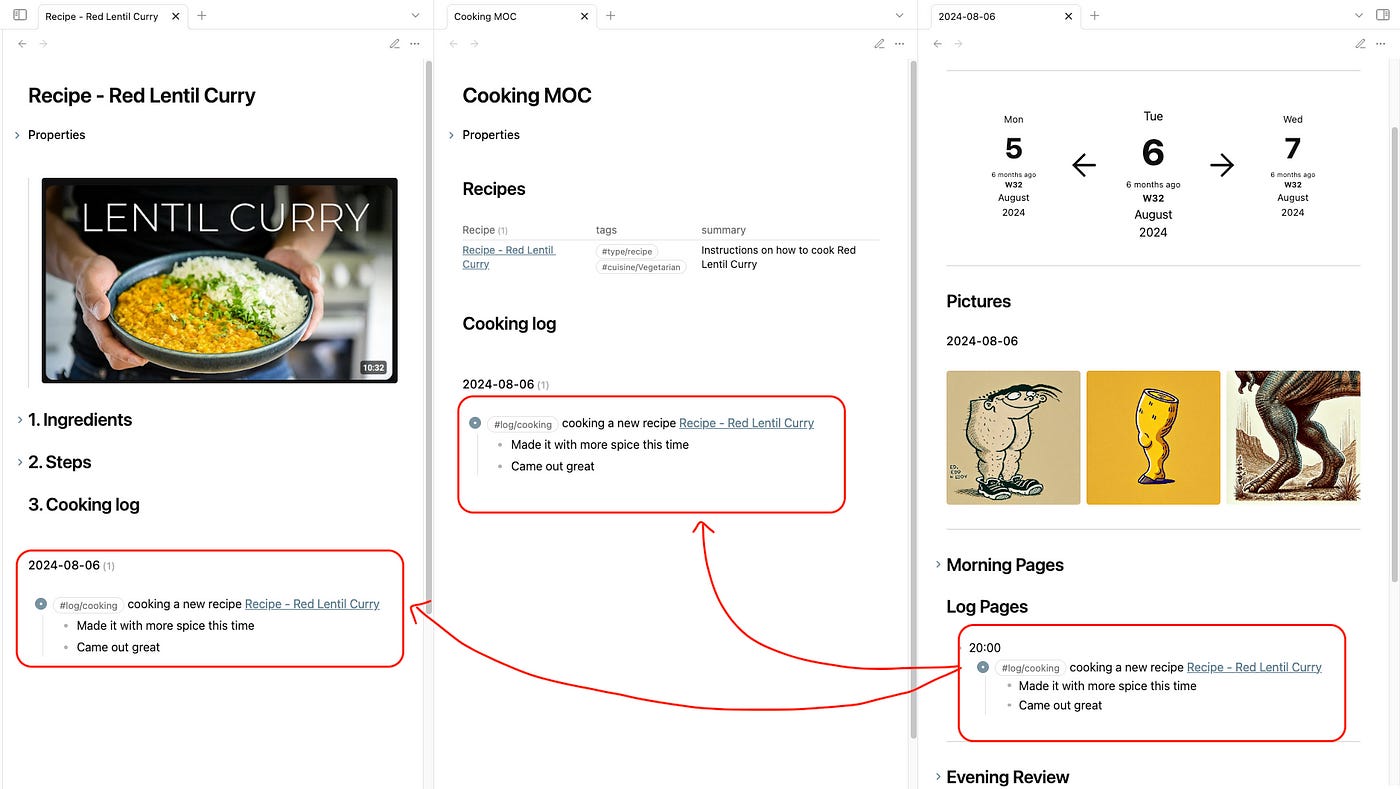
This query, placed in a [[Cooking MOC]], retrieves all cooking-related logs dynamically:
```dataview
TASK
WHERE icontains(text, "#log/cooking")
```
A similar query in the [[Recipe - Red Lentil Curry]] note ensures related cooking logs appear under its "Cooking Log" section:
```dataview
TASK
WHERE icontains(text, this.file.name)
AND icontains(text,"#log/cooking")
```
3. Statistical Metadata
Metadata consists of structured information stored in YAML frontmatter or inline metadata fields.
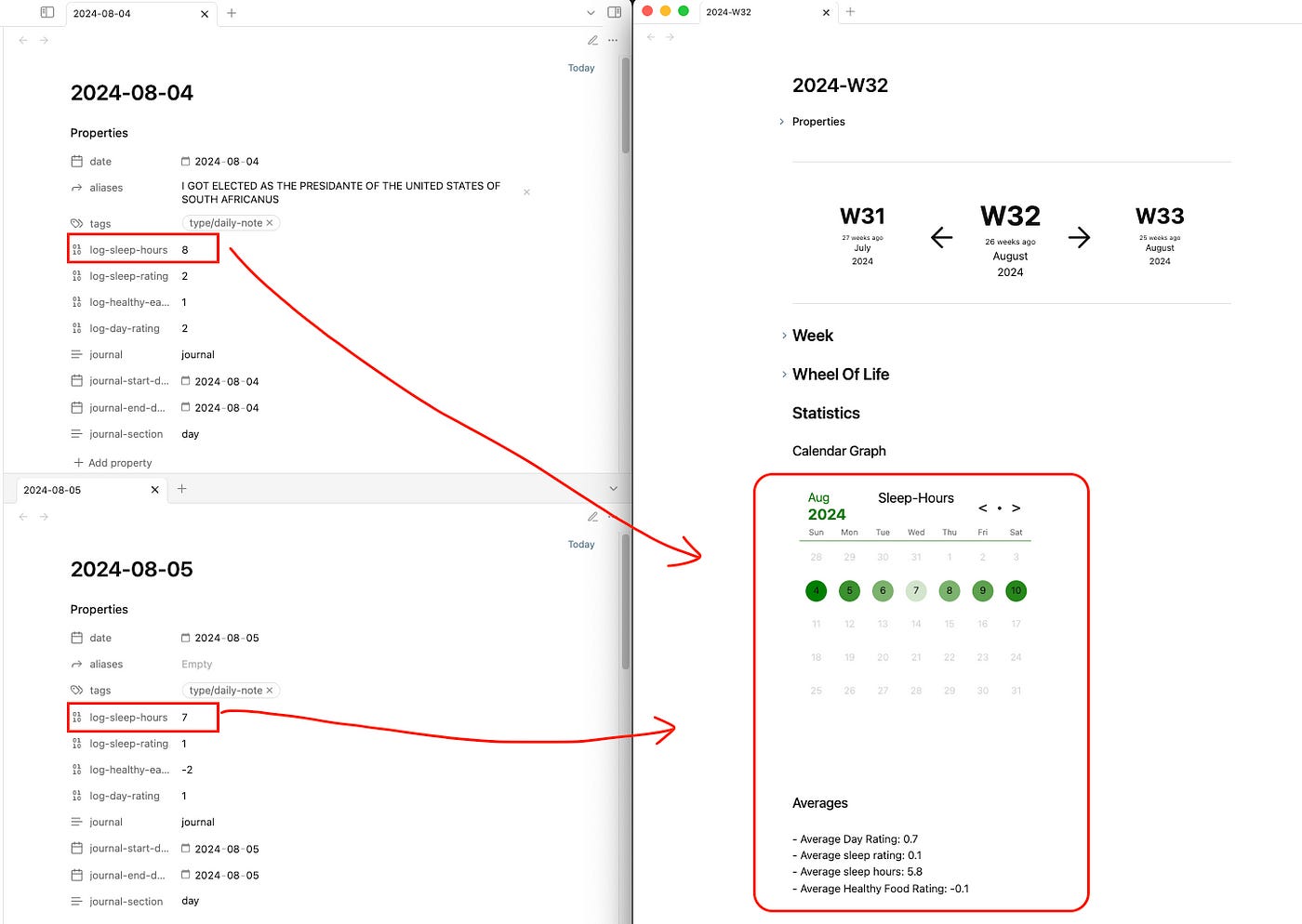
Examples of Metadata:
---
log-sleep-hours: 8
log-sleep-rating: 2
log-healthy-eating: 2
log-coffee: 5
log-water: 8
log-day-rating: 2
word-count: 500
status: completed
---
Capturing and Retrieving Metadata
Metadata is stored in YAML front-matter or inline fields (e.g., log-sleep-hours:: 8). It can be retrieved using Dataview queries, such as:
```dataview
TABLE
log-sleep-hours, log-sleep-rating, log-day-rating
WHERE icontains(tags, "#type/daily-note")
```
This query aggregates sleep and daily ratings across multiple journal entries.
Conclusion
A well-structured PKM system in Obsidian goes beyond storing notes — it enables seamless knowledge capture and effortless retrieval. By organizing information into notes, logs, and metadata, and leveraging Dataview queries, you can surface insights exactly when needed.
Getting Started:
Begin with simple tracking, such as daily notes or meeting logs.
Use tags and Dataview to refine retrieval.
Expand your system gradually as your workflow evolves.
Over time, your PKM will transform into a powerful knowledge network that enhances both personal reflection and professional productivity.
Get in Touch
I share PKM tips and tutorials on my YouTube channel and offer consulting, demo vaults, and courses to kickstart your PKM journey.
YouTube: ConstructByDee
Website: ConstructByDee.com